

Lucy in the Sky with Diamonds was a popular 1960s Beatles tune. Before you ask, yes, I am old enough to have been there. The screenshot below is from a little MakeCode chat command using a print block with text “Lucy” and diamonds to do the printing.


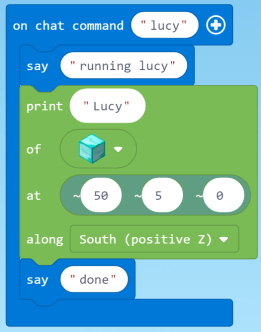

Which blocks (e.g., diamonds, grass) can be used to write in the sky?. Change diamonds to sunflowers. What happens? Lava? Water?
The position 

The phrase 

-


Keeping Score in the Sky


The “run” chat command is for testing the function printScore
The first say block signals that the program is actually running. The last say block indicates when it is complete. Why are these needed? Sometimes when “run” is typed into the command line, the program does not start. This may be because 

In the chat command “run,” the original player world position is saved in the variable “center.” This allows the player to move while the program is running. This is desirable because the view of the what’s happening in Minecraft is often better if the player is allowed to move to a different vantage point rather than being required to stay in one place because all positions are relative to the player and change as the player moves.
The repeat loop in “run” calls the printScore function 5 times to test randomly selected values for score..


The function printScore performs as its name indicates. It first converts the number variable score to text, which is required by the print block. The say block outputs the score to the log window.
In the print block, by joining txtScore with trailing spaces, the digits of any longer number that had been previously printed to the same location are erased.
Pay particular attention to the manner in which position is specified by the at phrase. The position is not specified as relative to the current player world positon but, rather, as relative to the original player world position, which was saved in the variable “center.” Notice that 

Demo of App and Code

Get the Code
The code for Print Score and Lucy is shared at https://makecode.com/_HpX7bY2ehM3H . It can be downloaded and run in MakeCode for Minecraft.